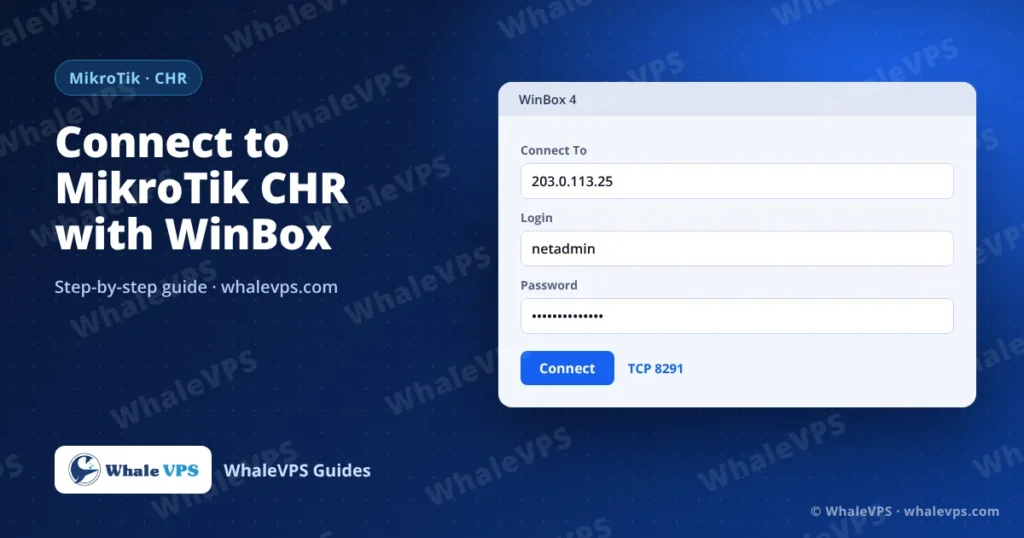
To connect to a MikroTik CHR VPS, download WinBox 4 from MikroTik, type the server’s public IP address in Connect To, enter admin and your password, and click Connect. WinBox talks to RouterOS on TCP port 8291, so that port must be reachable from your computer.
CHR (Cloud Hosted Router) is the RouterOS edition built for virtual machines. People run it on a VPS as a VPN endpoint, a tunnel hub between offices, or a lab router. This guide covers the connection itself and the security settings worth applying in the first ten minutes.
Which WinBox version should I use?
Use WinBox 4. It is a native app for Windows, macOS and Linux, so Mac and Linux users no longer need Wine. The Windows and Linux downloads are ZIP files that run without installation; extract each one into its own folder so the built-in updater works. macOS gets a normal DMG.
WinBox 3 still connects to RouterOS 7 but is now the legacy version.
Step 1: Find your login details
In the WhaleVPS client area, open Services → My Services and select the VPS. You need:
- The public IPv4 address
- The username, normally
admin - The password, if one was set during deployment
Step 2: Connect with WinBox
- Open WinBox.
- In Connect To, type the IP address. If you moved WinBox to another port, add it after a colon:
203.0.113.25:18291. - In Login, type
admin. - Enter the Password.
- Click Connect.
Do not use the Neighbors tab for a VPS. It finds routers on your local network by broadcast, and a router in a datacenter is never on your local network. Always connect by IP address.
Step 3: Set a password on first login
A freshly installed RouterOS 7 has no admin password and asks you to create one the first time you log in. Pick a long one and store it in a password manager. If you skip this, anyone who finds port 8291 open can take over the router.
You can change it later in System → Users → Password, or from the terminal:
/user set admin password="Use-A-Long-Unique-Passphrase"Can I connect without WinBox?
Yes. RouterOS offers three other ways in:
| Method | How to connect | Default port |
|---|---|---|
| SSH | ssh admin@203.0.113.25 | 22 |
| WebFig (browser) | http://203.0.113.25 | 80 |
| API | Scripts and monitoring tools | 8728 / 8729 (TLS) |
SSH is handy when you only need to paste a few commands. Our SSH connection guide explains the client side on every operating system.
Secure WinBox in five minutes
Port 8291 on a public IP is scanned by bots every day. These commands, run from New Terminal in WinBox, close most of the holes. Replace 198.51.100.10 with your own public IP address.
Limit WinBox and SSH to your IP:
/ip service set winbox address=198.51.100.10/32
/ip service set ssh address=198.51.100.10/32
Turn off services you don’t use:
/ip service disable telnet,ftp,www,api,api-sslCreate a personal admin account and disable the default one:
/user add name=netadmin group=full password="Another-Long-Passphrase"
/user disable admin
Log out and back in as netadmin before you disable admin, so you know the new account works.
Keep RouterOS current:
/system package update check-for-updates
/system package update install
The router reboots after an upgrade. Reconnect after a minute.
If your home IP changes often, limiting WinBox to one address will lock you out. In that case, connect to the CHR over a VPN (WireGuard is built into RouterOS 7) and allow WinBox only from the VPN subnet.
What if WinBox can’t connect?
- “Could not connect, connection timed out”: the IP is wrong, the VPS is stopped, or port 8291 is blocked by a firewall rule you added. Use the VPS console in the client area to check
/ip service print. - “Wrong username or password”: RouterOS usernames are case-sensitive. After several failures, wait a minute before trying again.
- You locked yourself out with the address filter: open the VPS console and run
/ip service set winbox address=""to remove the restriction.
Frequently asked questions
Is a CHR license required?
CHR runs without a paid license, but the free level caps upload speed on each interface at 1 Mbit/s. For real traffic you need a paid CHR license (P1, P2 or P-Unlimited) from MikroTik.
Which location should I choose for a MikroTik VPN server?
Choose the location closest to the people or offices that will connect to it. For users in the Gulf, a Bahrain VPS keeps latency low; for Europe, an Austria VPS or Germany VPS is central.
Does WinBox work on a Mac?
Yes. WinBox 4 runs natively on macOS, both Intel and Apple Silicon.
Can I manage several routers from one WinBox window?
Save each router in the Saved tab with an address, username and optional comment. You can protect saved passwords with Set file password.